
1 Pages (3 items)
"Display of units and squares" - Messages
#1 Posted: 4/3/2026 11:49:17 AM

矩形截面偏压(测试-chen).pdf (660.37 KiB) downloaded 569 time(s).
"1. Currently, units like kN/m are displayed vertically. The customary display method is horizontal: kN/m.
2. For units like m², the superscript '2' appears too large, affecting the aesthetics.
Please adjust accordingly."
"1. Currently, units like kN/m are displayed vertically. The customary display method is horizontal: kN/m.
2. For units like m², the superscript '2' appears too large, affecting the aesthetics.
Please adjust accordingly."
Edited 4/3/2026 11:50:31 AM
#2 Posted: 4/3/2026 12:37:15 PM
This is due to composite units being built using the standard operator formatting and font sizes in SMath Studio.
I agree that an inline fraction operator would be nice, in particular for formulas embedded in text.
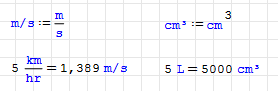
Yet, if you really want, you can define your own units. Note that you need to press Ctrl-K for entering special characters like / as parts of names.
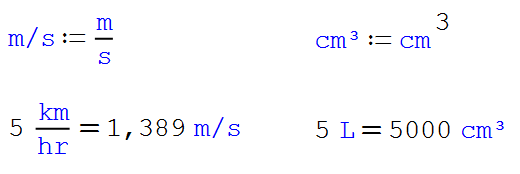
Given the low resolution of the fonts at standard zoom level, the superscript font is hard to read, so this might be a matter of taste.
I agree that an inline fraction operator would be nice, in particular for formulas embedded in text.
Yet, if you really want, you can define your own units. Note that you need to press Ctrl-K for entering special characters like / as parts of names.
Given the low resolution of the fonts at standard zoom level, the superscript font is hard to read, so this might be a matter of taste.
Edited 4/3/2026 12:37:31 PM
Technische Mechanik mit SMath Studio: https://link.springer.com/book/10.1007/978-3-658-50592-9
1 users liked this post
⚜ Kenny Lemens, P.E. ᵂᴵ 4/16/2026 4:01:23 PM
#3 Posted: 8/19/2026 7:13:11 PM

Greetings,
To this effect, you can also modify the units.xml file to have these inline/square/cubed units to be saved as default; that is the best way if you also wish the default result to display a desired unit (vs. having to manually specify the compact unit.
May this be of Good Help;
⚜ Kenny Lemens, P.E. ᵂᴵ
To this effect, you can also modify the units.xml file to have these inline/square/cubed units to be saved as default; that is the best way if you also wish the default result to display a desired unit (vs. having to manually specify the compact unit.
May this be of Good Help;
⚜ Kenny Lemens, P.E. ᵂᴵ
"No matter where you go, there you are." -Buckaroo BanzaiHotkeys: https://en.smath.com/forum/resource.ashx?a=45771&b=2
1 Pages (3 items)
- New Posts
- No New Posts